AI agents (MCP)
Claude Code, Codex, Cursor and other AI agents can work on your servers through Detour. They use your hosts, keys and saved passwords without ever seeing them, only where and for as long as you allow, and you see everything they do.
Connect an agent
Detour is an MCP server: detour mcp. Add it to your AI client:
- in the app, Settings → Detour in AI clients lists the clients on this computer: click Add, then restart the client;
- or in a terminal:
detour mcp clients            # which clients are here, and which have Detour
detour mcp add                # add it to all of them
detour mcp add claude-code    # or to one: claude-code, claude-desktop, codex, cursor, vscode, windsurf, gemini
detour mcp remove cursor
Other clients take it by hand: the command is detour with the argument mcp, over stdio. For example, for Claude Code:
claude mcp add --scope user detour -- detour mcp
Asking for access
An agent starts with nothing. It can see the list of your hosts (names, addresses and users, never a password or key) and ask for access. The request comes to you:
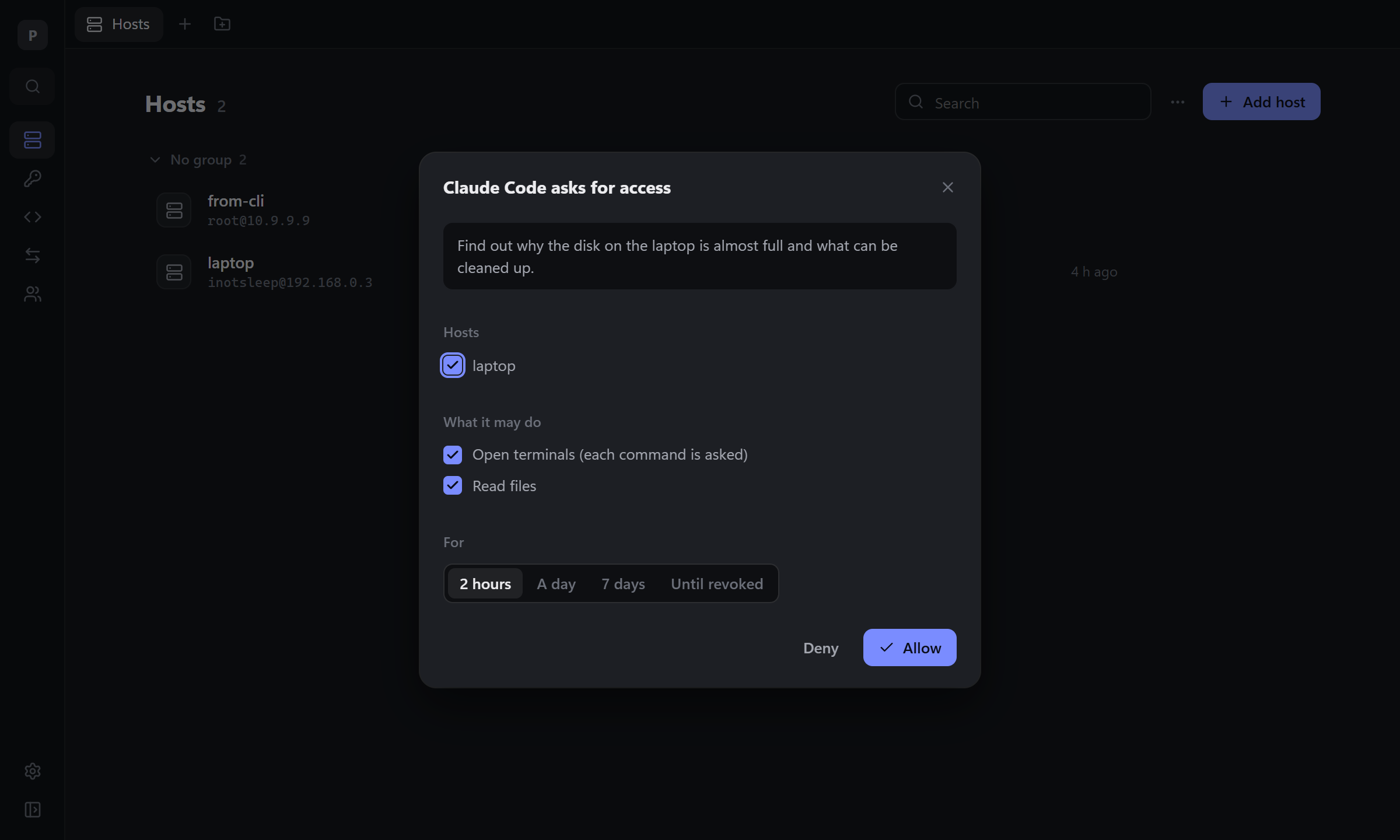
You see which agent asks, why, for which hosts and what it wants to do there. Untick hosts or rights you don't want to give, or tick more, pick for how long, and click Allow, or Deny. When the hosts asked for are all in one team or group, you can give it all of the team or the group instead, so the next hosts there don't ask again.
| Right | What the agent can do |
|---|---|
| Open terminals (each command is asked) | open sessions; every command and everything it types waits for you to allow it |
| Run commands without asking | run commands and type into its sessions |
| Read files | list, read and download files |
| Change files | write, upload, rename, remove files, change permissions |
| Start tunnels | start and stop your saved tunnels through the host |
| Edit hosts, snippets, tunnels and keys | change your vault, and in a team the hosts its access reaches; new keys are made inside Detour, the agent gets only the public part |
| Accept keys of new servers | connect to a server no one has connected to yet, accepting its key as you would; a key that changed is never accepted |
Access lasts 2 hours, a day, 7 days, or until you revoke it.
Access given ahead
So an agent doesn't stop and ask at every step (overnight, with no one to answer), give it access before it starts: Settings → AI agents → New access.
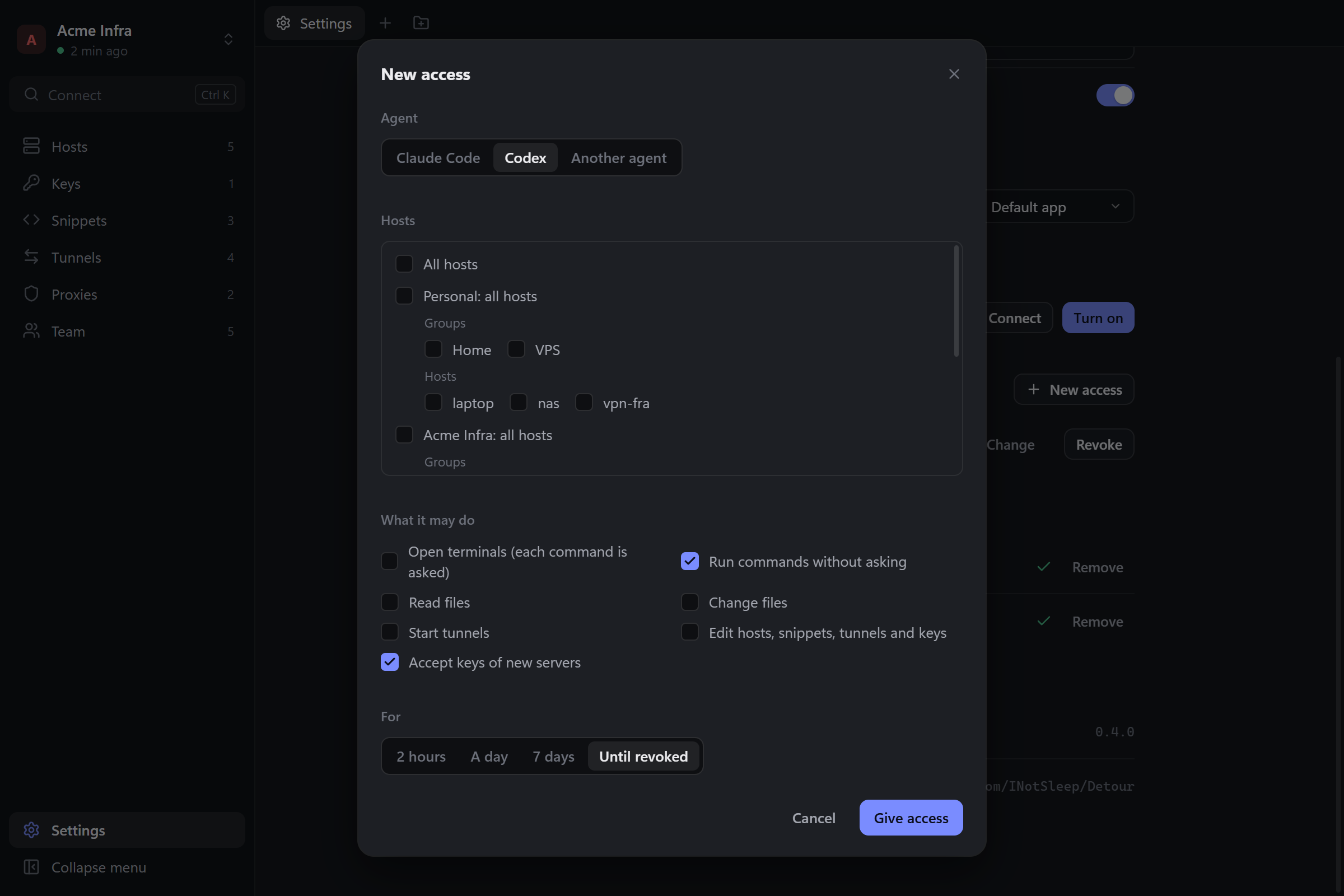
- Agent: one of the AI clients on this computer, or another one by name.
- Hosts: all of them, everything in your personal vault or a team, groups (shared ones, or your own in a team), or single hosts. Hosts added to a team or a group later are in it too.
- What it may do and for how long, as in a request.
Give access puts the access into that client's MCP settings: restart the client, and the agent works with it from the start, after every restart too. For another agent you get its token to set as DETOUR_TOKEN in its MCP settings.
The agent asks only for what goes beyond it: a request for hosts and rights it already has is answered at once, without a window. Change on any access in the list changes its hosts, rights or time without a new token; sessions on hosts it no longer reaches end at once.
The same from a terminal:
detour agents add Codex --vault Acme --exec --edit --accept-new-keys --client codex
detour -T Acme agents add "Claude Code" --group Production --exec --files-write
detour agents edit Codex --vault Acme --exec
--all, --vault, --group (of the vault -T names), --my-group and --host pick the hosts; --exec, --files, --files-write, --tunnels, --edit and --accept-new-keys what it may do; --ttl for how long (never by default). Without --client the token is printed once.
The window comes forward with the request, also when an agent started Detour itself: Detour waits in the tray then. Where no window can show (a server, an SSH session), the agent tells you to run detour approve in your terminal: it shows the same request and asks the same questions there.
Commands an agent runs
With Open terminals, every command waits for you:
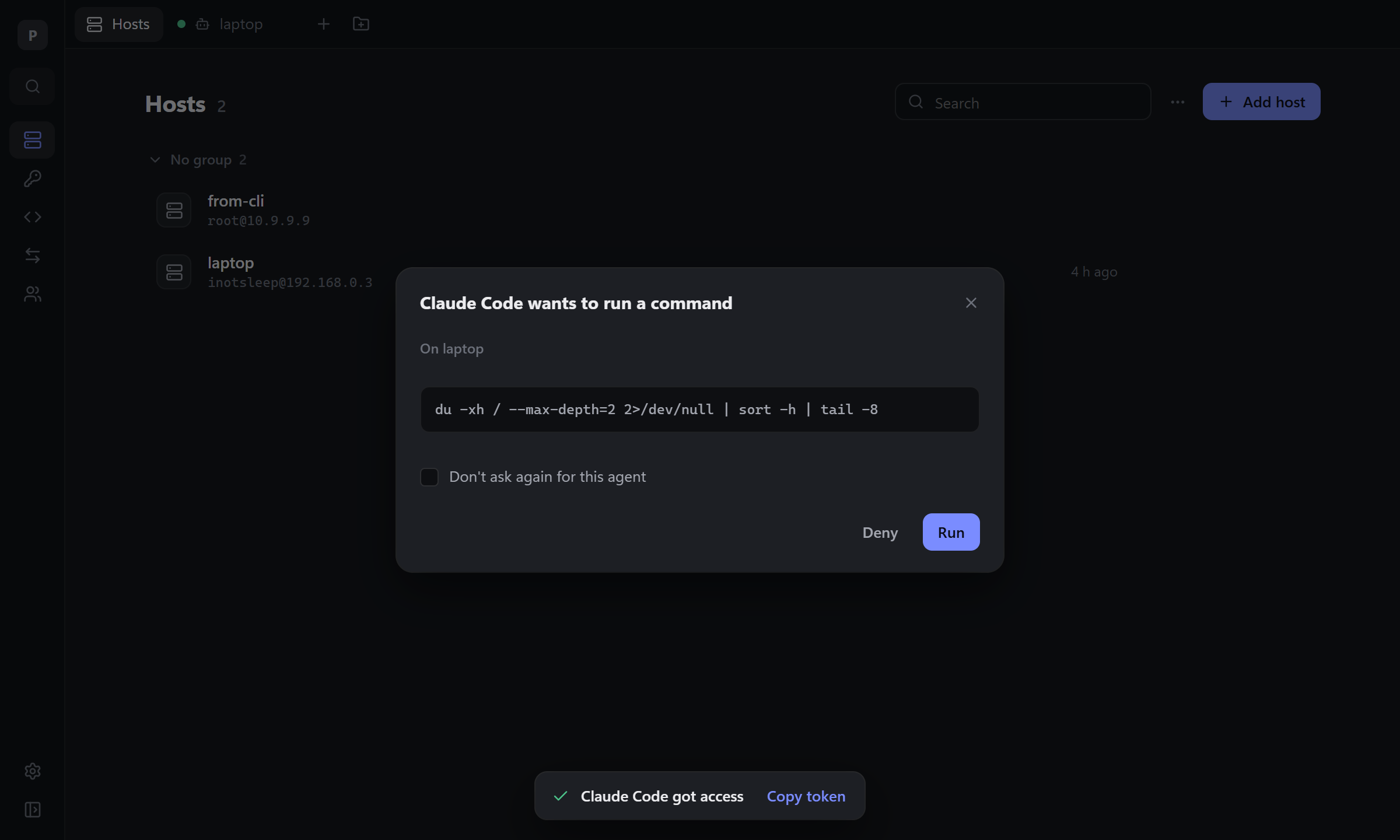
Run lets it through; Don't ask again for this agent gives it Run commands without asking from then on.
Watching an agent work
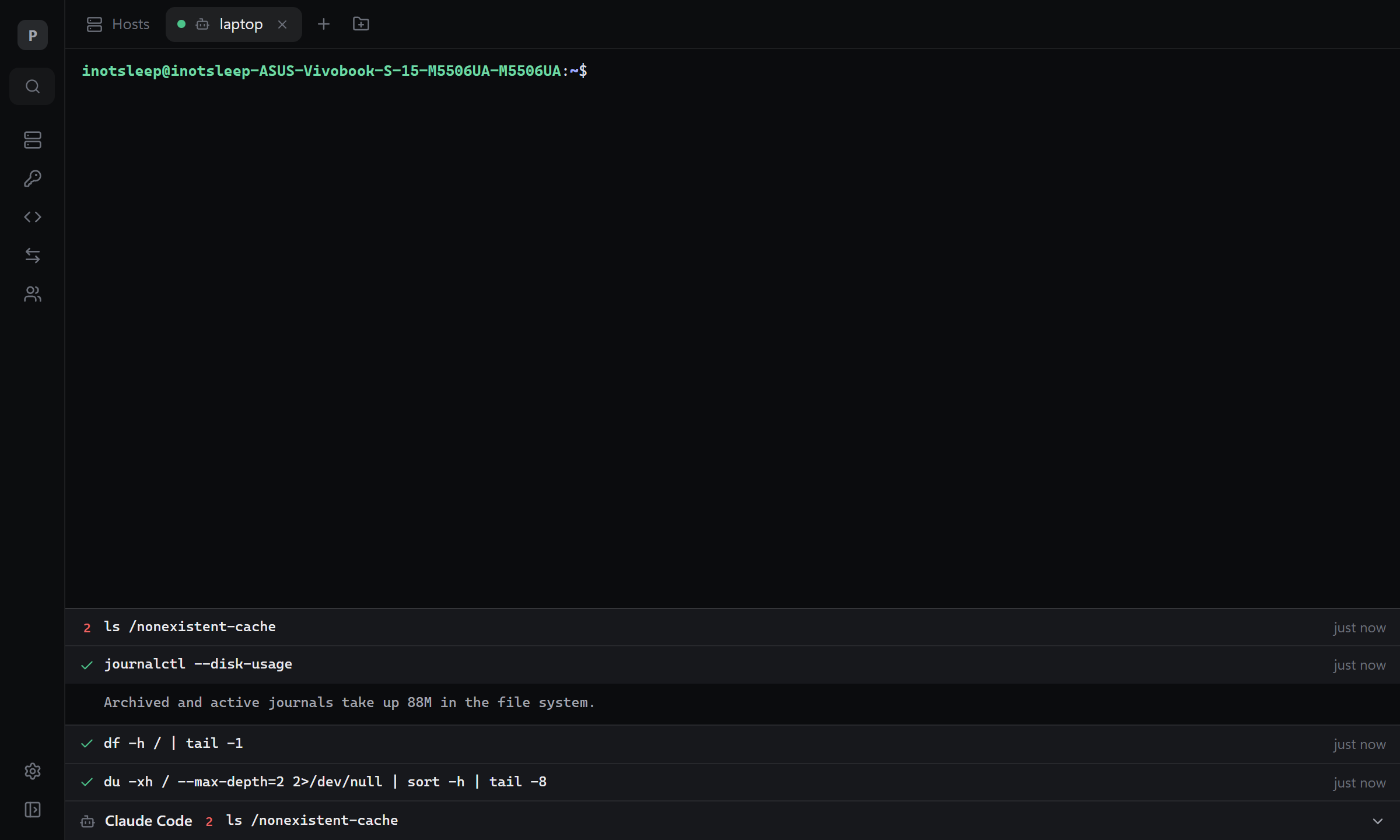
An agent's session opens as a tab with a robot icon, beside your own. You see its terminal and can type into it yourself. Under the terminal, a strip shows the commands it ran: the last one, its exit code, and, on a click, all of them with their output.
Revoking
Settings → AI agents lists every agent with access: its hosts, rights, until when, and when it last used them. Revoke takes the access away at once and closes its sessions, file browsers and tunnels.
detour agents ls
detour agents revoke "Claude Code"     # every token of that agent; or a token's id
What an agent can't do
- See a password, a passphrase or a private key, or export a key.
- Accept a server key it hasn't seen, unless you gave it Accept keys of new servers: otherwise Detour connects only to servers you confirmed yourself. A key that changed is never accepted by an agent.
- Forward ssh-agent from its sessions, even on a host where you do.
- Touch another agent's session, or yours. It works only in sessions it opened.
- Manage teams, members or access, or other agents' access. In a team it changes only the hosts its access reaches, and adds hosts only with access to the whole team.
- Use
detourin your terminal instead: the command line works only in a terminal you trusted, and the master password is never read from a pipe.
These limits are kept by the core, not by the agent's goodwill. They protect you from an agent that makes a mistake or takes a shortcut. A program that runs as your user and is set on harm can read the memory of your other programs, Detour included; that is the operating system's boundary, not Detour's.
The token
When you allow a request, the agent's detour mcp gets a token and keeps it while it runs. Detour stores only its hash. The message Claude Code got access has Copy token: set it as DETOUR_TOKEN in the client's MCP settings, and the agent keeps the access between its sessions, until it expires or you revoke it. Access given ahead does this for you. DETOUR_TOKEN may hold several tokens, separated by commas.
Tools
| Tool | |
|---|---|
list_hosts, request_access, wait_for_access |
hosts and access |
open_session, list_sessions, close_session |
sessions |
run_command |
a command beside the terminal: its exit code, stdout and stderr |
send_input, read_screen |
typing into the terminal and reading what it shows, for interactive programs |
list_dir, read_file, write_file, upload, download, make_dir, rename, remove, chmod |
files |
list_tunnels, start_tunnel, stop_tunnel |
tunnels |
list_snippets, run_snippet |
snippets |
add_host, update_host, remove_host, add_snippet, remove_snippet, generate_key, sync_now |
the vault |